


Cisco 350-401 - Implementing Cisco Enterprise Network Core Technologies (350-401 ENCOR)
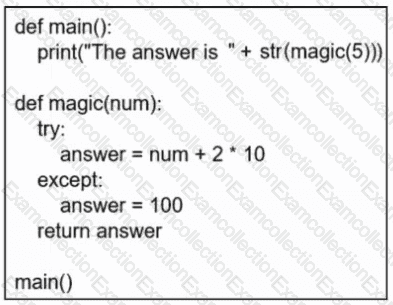
Refer to the exhibit. What is displayed when the code is run?
What is the measure of the difference between the received signal and the noise floor in a wireless environment?
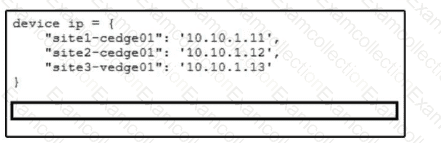
Refer to the exhibit. The key value pairs must be extracted by iterating through a list of tuples. Which statement completes the snippet and prints each key value pair as a tuple?
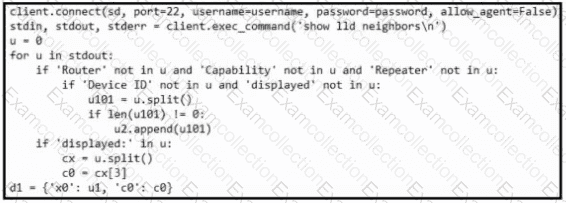
Refer to the exhibit. What is achieved by this Python script?
Why is a Type 1 hypervisor more efficient than a Type 2 hypervisor?
Which network design reduces convergence time between an aggregation layer and a Layer 2 access layer in an enterprise network?
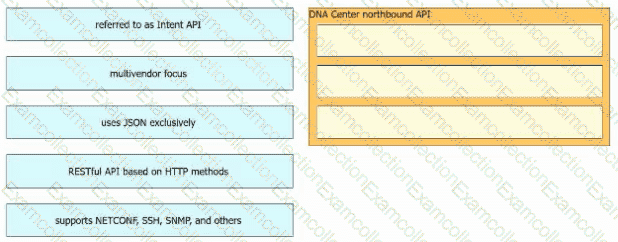
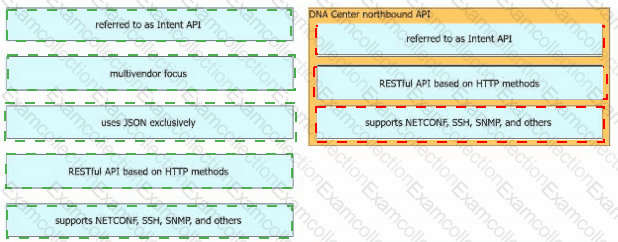
Drag and drop the Cisco Catalyst Center (formerly DNA Center) northbound API characteristics from the left to the right. Not all options are used.
What is a characteristic of a traditional WAN?
Refer to the exhibit.
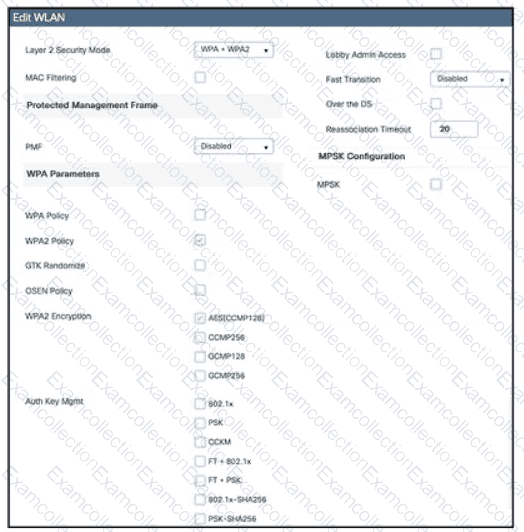
Which action must be taken to configure a WLAN for WPA2-AES with PSK and allow only 802.11r-capable clients to connect?
What is the intent API in Cisco Catalyst Center (formerly DNA Center)?
