


Pre-Winter Sale Special Limited Time 70% Discount Offer - Ends in 0d 00h 00m 00s - Coupon code: xmas50

Apple Apple-Device-Support - Apple Device Support Exam (SUP-2026)

Page: 8 / 9
Total 273 questions

Where are sysdiagnose log files located on iPhone?

A.

Settings > Privacy & Security > Analytics & Improvements > Analytics Data

B.

Settings > Privacy > Tracking

C.

Settings > Privacy > Analytics & Improvements > Share With App Developers

You ' re experiencing odd behavior with a Custom App on your iPad.

How should you gather information about the app issue?

A.

Turn on debug logging.

B.

Open Apple Configurator for iPhone and run diagnostics.

C.

Turn on advanced analytics.

D.

Gather a sysdiagnose.

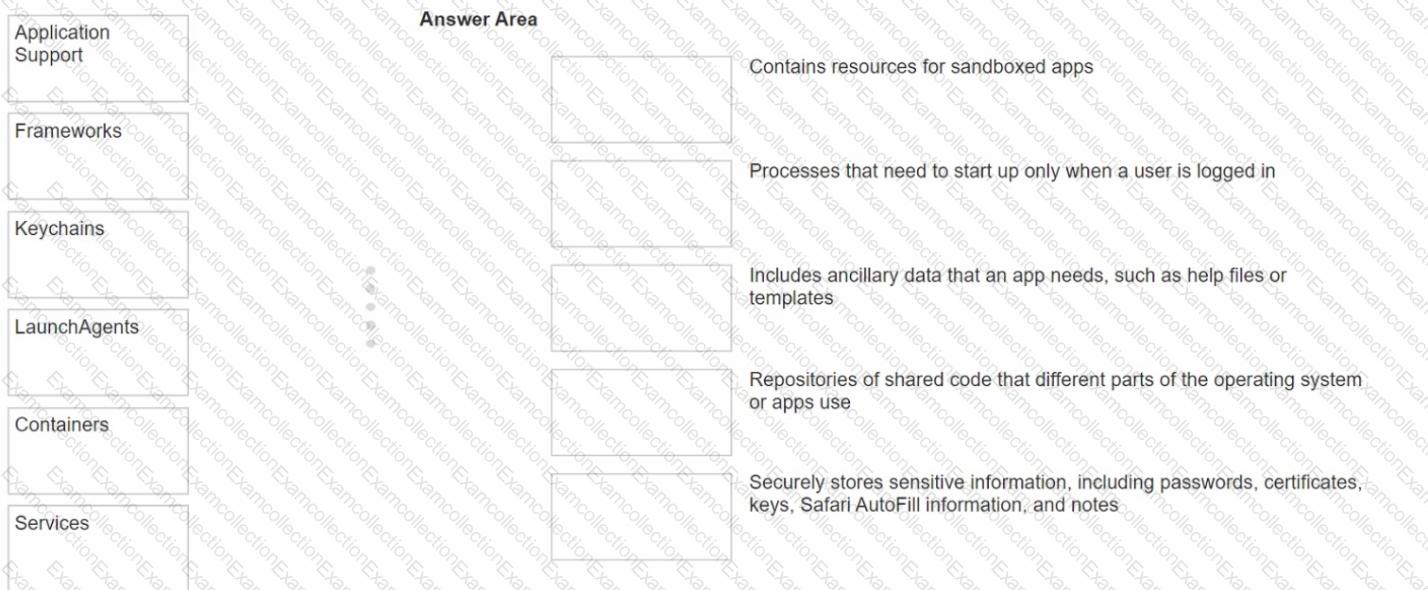
Match the macOS library resources listed on the left to the descriptions on the right by dragging responses to the correct target areas. Responses may be used once, more than once, or not at all.
Which app should you configure to get live image descriptions of your surroundings on iPhone?

A.

Camera

B.

Magnifier

C.

Scanner

D.

Settings

E.

Photos

Select Four.

What file system formats are available in Disk Utility on a Mac

A.

APFS

B.

NTFS

C.

Mac OS Extended

D.

ExFat

E.

GFS

F.

MS-DOS (FAT)

How do you quit out of a man page in Terminal Mac?

A.

less

B.

clear

C.

q

D.

esc

What does Find My use to locate lost or missing devices?

A.

Bluetooth

B.

Cellular Data

C.

Built in trackers

D.

Wi-Fi

Which Find My feature is available ONLY on MacBook models with Apple silicon?

A.

Notify When Found

B.

View Location

C.

Remote Erase

D.

Notify When Left Behind

Scenario

You would like to access files stored in iCIoud Drive on your Windows PC at work.

What should you do to access these files on your PC?

A.

Download iCIoud Drive from the Windows App Store and set it up using your Apple ID.

B.

Download iCIoud for Windows and set it up with your Apple ID.

C.

Copy the content of iCIoud Drive from your Mac to an external drive, and connect the external drive to your Windows PC.

Select Three.

When do you need your Passcode to Enable Face ID?

A.

You updated your phone.

B.

After five attempts to recognize a face unsuccessfully.

C.

You haven ' t unlocked the phone using a passcode for more tha hasn ' t been used in the last 4 hours.

D.

Your phone has been in sleep mode for the last 8 hours.

E.

You haven ' t unlocked your phone in more than 2 days.