


Microsoft MS-700 - Managing Microsoft Teams
You have a Microsoft 365 E5 subscription that uses Microsoft Teams and a hybrid deployment of Microsoft Skype for Business Server.
Coexistence mode in Microsoft Teams is set to Islands .
Coexistence mode is configured for three users named User1, User2, and User3 as shown in the following table.

The Skype for Business user accounts are homed as shown in the following table.
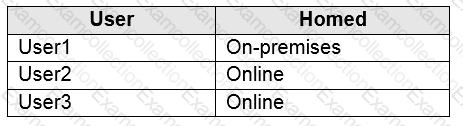
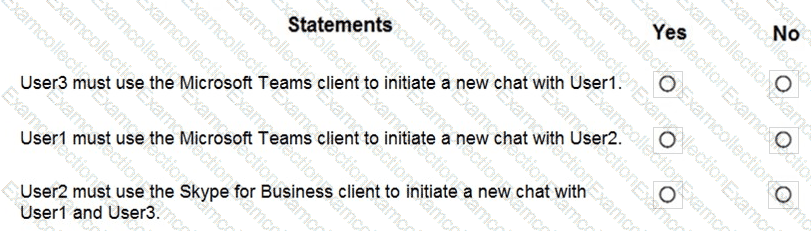
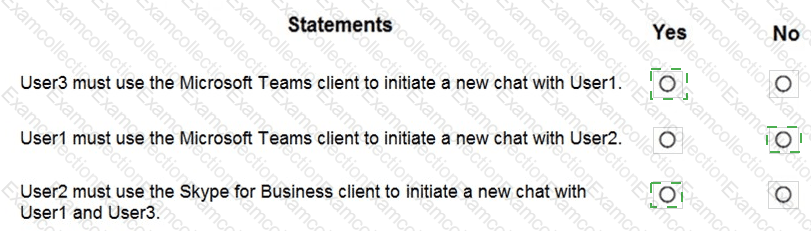
For each of the following statements, select Yes if the statement is true. Otherwise, select No.
NOTE: Each correct selection is worth one point.
You have a Microsoft 365 E5 subscription that has Phone System enabled for all Microsoft Teams users.
You need to configure the Phone System to meet the following requirements:
Provide a virtual receptionist that connects callers to either a specific user or the help desk.
Route calls to the help desk on a First in, First out (FIFO) order.
Which two resources should you create? Each correct answer presents part of the solution.
NOTE: Each correct selection is worth one point.
Your company is upgrading from Microsoft Skype for Business Online to Microsoft Teams.
The company ' s Microsoft Teams upgrade policy is set to Islands coexistence mode. The company plans to maintain the coexistence mode for several months.
Several users report that they receive email messages about missed chat conversations.
You need to recommend a solution to ensure that all the users receive chat messages.
Which two actions should you recommend? Each correct answer presents part of the solution.
NOTE : Each correct selection is worth one point.
You have a Microsoft Office 365 subscription.
You create a team named Room1.
You need to ensure that Room1 automatically accepts meeting invitations. The solution must prevent meeting invitations from being accepted if the room is unavailable.
How should you complete the PowerShell command? To answer, select the appropriate options in the answer area.
NOTE: Each correct selection is worth one point.


You have a Microsoft 365 subscription that uses Microsoft Teams.
You have the users shown in the following table.
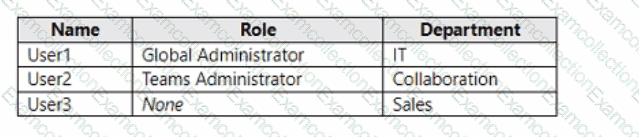
You have the team shown in the following table.
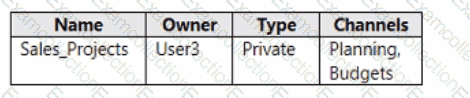
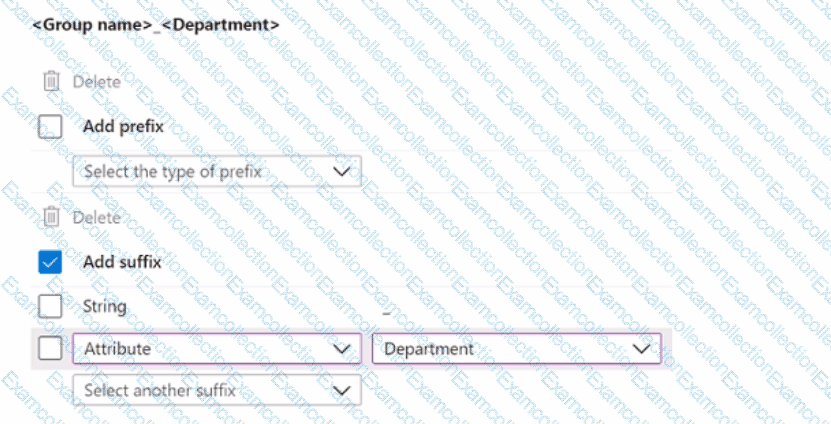
You create a new group naming policy as shown in the following exhibit.
Group naming policy
The Microsoft 365 groups naming policy allows you to add a specific prefix and/or suffix to the group name and alias of any Microsoft 365 group created by users. For example: < Finance > < group > < Seattle >
Current policy
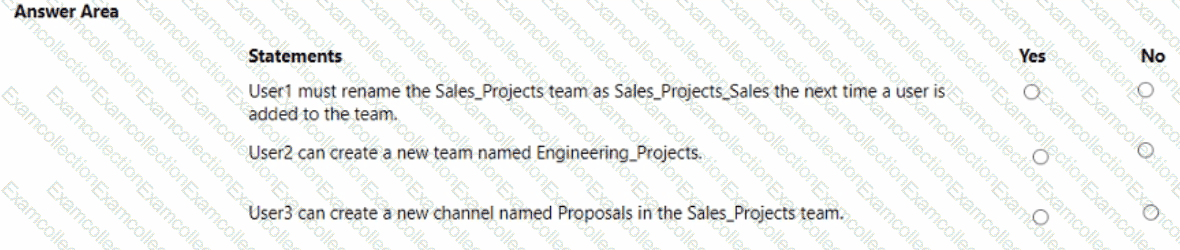
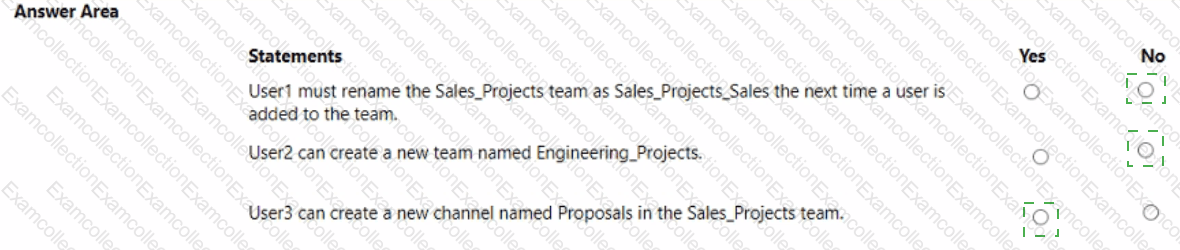
For each of the following statements, select Yes if the statement is true. Otherwise, select No.
NOTE: Each correct selection is worth one point.
Your company uses Teams Calling Plans.
When a user places a Teams call to an ambulance service, you need to ensure that a notification is also sent to the main receptionist of the company.
What should you configure?
You have a Microsoft 365 E5 subscription that uses Teams.
Your company requires that all inactive teams be deleted.
You need to identify teams that were inactive during the last 90 days.
What should you use?
You have a Microsoft 365 E5 subscription that includes Teams.
When a user named User! downloads and installs the new Teams desktop client on a Windows 10 device, the user receives the following error message:
" We ' ve run into an issue. "
You need to ensure that User! can install the new Teams desktop client.
What should you do?
You have a Microsoft 365 subscription that uses Microsoft Teams.
You need to ensure that Microsoft Teams audio, video, and screen sharing data is prioritized over other data types across the network.
What should you do from the Microsoft Teams admin center?
You have a Teams deployment. A user cannot sign in to Teams.
You need to run self-help diagnostics to troubleshoot the issue.
Solution: From the Microsoft Teams admin center, you select Teams advisor.
Does this meet the goal?
