


Pre-Summer Sale Special Limited Time 70% Discount Offer - Ends in 0d 00h 00m 00s - Coupon code: xmas50

Adobe AD0-E911 - Adobe Workfront Project Manager Certified Professional
Page: 1 / 3
Total 95 questions

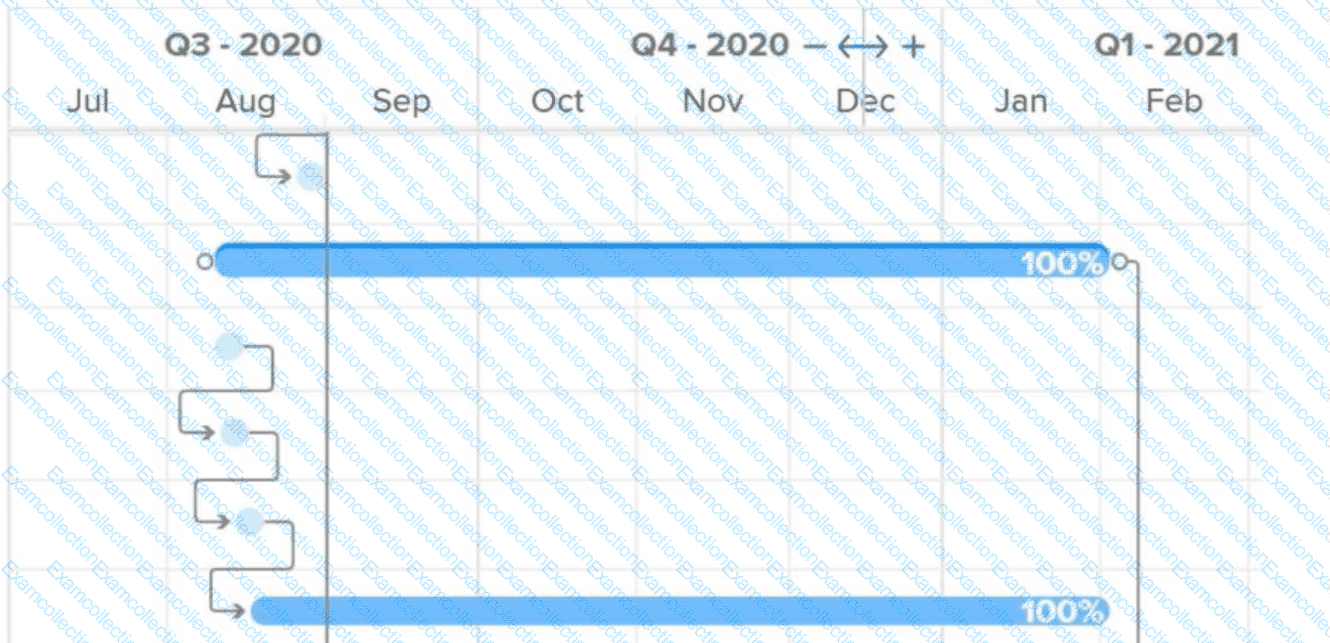
What do the connector lines between tasks in a Gantt chart represent?

A.

Critical path

B.

Multiple assignments

C.

Predecessor relationship

A marketing team wants to manage their projects using a traditional, sequential approach where each phase must be completed before the next begins.

Which project management methodology in Workfront supports this approach?

A.

Scrum

B.

Kanban

C.

Waterfall

All of the tasks on a project show as 100% complete, but when the Project Owner tries to update the status of the project to Complete, the Owner receives an error that reads " Project cannot be marked Complete if there are open issues and tasks that are not complete. " How can the Project Owner determine which tasks are incomplete?

A.

There are incomplete approval workflows on one or more tasks. The Project Owner could filter the project task list for incomplete tasks and check the task status to determine which tasks are not complete.

B.

There are incomplete issue predecessors that need to be resolved. The Project Owner can navigate to the project issues section in the left navigation pane to see the incomplete items.

C.

The task status needs to be updated to Done even though the percent complete is at 100%. The Project Owner could filter the project task list for incomplete tasks and check the task status to determine which tasks are not complete.

Which initial project setting would a project owner use to identify and report on key tasks on a project?

A.

Milestone Path

B.

Schedule

C.

Resource Leveling Mode

What occurs when an individual enters a new commit date that is after the original planned date of a task?

A.

The assignee of any task that has the original task set as a predecessor is notified.

B.

The Project Owner is notified whether this change will impact the Project Timeline.

C.

The Planned Completion Date of the task automatically changes to match the new Commit Date.

A project manager is updating a project in Workfront that is behind schedule.

Which action could be taken so that all tasks are completed by the requested completion date?

A.

Give all tasks a Task Constraint of “Must Start On”

B.

Reduce the durations of the tasks.

C.

Adjust all of the Planned Start Dates to the same day.

Which Workfront collection of users allows a task or issue to be assigned to multiple people?

A.

Team

B.

Group

C.

Project Team

A system administrator has created a Marketing Request Queue that routes to the marketing team. This team needs to manage various incoming requests from the organization through emails, instant messaging, and conversations. Team members receive request notifications in their emails but are still having difficulties monitoring and prioritizing incoming requests.

Which reports would be helpful to have on a dashboard for the marketing team to manage incoming work requests?

A.

Four reports showing the entry date of each request, i.e., one that shows requests in a New status, one that shows requests in an In Progress status, a third report that shows recently completed requests, and a fourth report that shows the schedule assigned to each team member.

B.

Two reports showing the priority and actual completion date of each request, i.e., one that shows active requests and another that shows recently completed requests.

C.

Three reports showing the priority and entry date of each request, i.e., one that shows requests in a New status, one that shows requests in an In Progress status, and one that shows recently completed requests.

A project sponsor has asked to see a summary of all projects that they are the sponsor of which were completed in the past year. The project sponsor wants to see the information grouped by the month the project was completed. What steps should the project manager take to create this view?

A.

Visit the Reports page and create a Project report. In the filter, update the actual completion date value to " past year " and update the Project Sponsor ID field to the project sponsor’s name. In the grouping tab, add a grouping for the actual completion date. In the Group Dates by field, select " month. "

B.

Visit the Reports page and create a Project Sponsor report. In the filter, update the actual completion date value with custom dates for the past year and update the Project Sponsor ID field to the project sponsor’s name. In the grouping tab, add a grouping for the planned completion date. In the Group Dates by field, select " month of year. "

C.

Visit the Dashboards page and create a Project report. In the filter, update the actual completion date value to " past year " and update the Project Sponsor ID field to the project sponsor’s name. In the grouping tab, add a grouping for the actual completion date. In the Group Dates by field, select " month of year. "

A user wants to add users to a proof based on who requested the project and the additional approvers listed in the request.

Which Workflow should the user choose?

A.

Automated

B.

Basic

C.

Manual