New Year Sale Special Limited Time 70% Discount Offer - Ends in 0d 00h 00m 00s - Coupon code: xmas50

Salesforce JavaScript-Developer-I - Salesforce Certified JavaScript Developer (JS-Dev-101)

Page: 7 / 7
Total 219 questions

The developer wants to test the array shown:

const arr = Array(5).fill(0)

Which two tests are the most accurate for this array ?

Choose 2 answers:

A.

console.assert( arr.length === 5 );

B.

arr.forEach(elem => console.assert(elem === 0)) ;

C.

console.assert(arr[0] === 0 && arr[ arr.length] === 0);

D.

console.assert (arr.length >0);

At Universal Containers, every team has its own way of copying JavaScript objects. The

code

Snippet shows an implementation from one team:

Function Person() {

this.firstName = “John”;

this.lastName = ‘Doe’;

This.name =() => (

console.log(‘Hello $(this.firstName) $(this.firstName)’);

)}

Const john = new Person ();

Const dan =JSON.parse(JSON.stringify(john));

dan.firstName =’Dan’;

dan.name();

What is the Output of the code execution?

A.

Hello Dan Doe

B.

Hello John DOe

C.

TypeError: dan.name is not a function

D.

TypeError: Assignment to constant variable.

A developer creates a simple webpage with an input field. When a user enters text in

the inputfield and clicks the button, the actual value of the field must be displayed in the

console.

Here is the HTML file content:

The developer wrote the javascript codebelow:

Const button = document.querySelector(‘button’);

button.addEvenListener(‘click’, () => (

Const input = document.querySelector(‘input’);

console.log(input.getAttribute(‘value’));

When the user clicks the button, the output is always “Hello”.

What needs to be done make this code work as expected?

A.

Replace line 04 with console.log(input .value);

B.

Replace line 03 with const input = document.getElementByName(‘input’);

C.

Replace line 02 with button.addEventListener(“onclick”, function() {

D.

Replace line 02 with button.addCallback(“click”, function() {

Refer to the code below:

Click me!

Which code change should be made for the console to log only Row log when ‘Click me! ’ is

clicked?

A.

Add.event.stopPropagation(); to window.onLoad event handler.

B.

Add event.stopPropagation(); to printMessage function.

C.

Add event.removeEventListener(); to window.onLoad event handler.

D.

Add event.removeEventListener(); toprintMessage function.

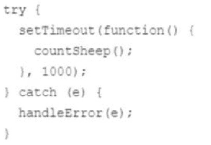
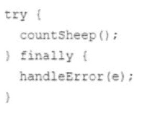
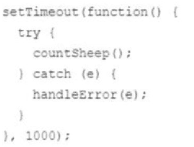
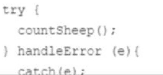
A developer wants to use a try...catch statement to catch any error that countSheep () may throw and pass it to a handleError () function.

What is the correct implementation of the try...catch?

A)

B)

C)

D)

A.

Option

B.

Option

C.

Option

D.

Option