


F5 F5CAB1 - BIG-IP Administration Install, Initial Configuration, and Upgrade
For security reasons, a BIG-IP Administrator needs to specify allowable IP ranges for access to the Configuration Utility (WebUI).
The exhibit shows the User Administration section of the Configuration Utility.
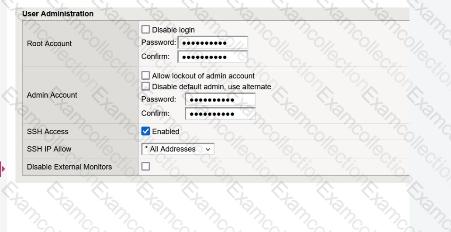
The administrator could not find any setting that explicitly restricts access to the Configuration Utility.
Which one of the following is a reason for that?
A BIG-IP Administrator needs to install a HotFix on a standalone BIG-IP device.
The device currently has HD1.1 as the Active Boot Location.
The administrator has already reactivated the license and created a UCS archive.
In which sequence should the administrator perform the remaining steps ?
Refer to the exhibit.
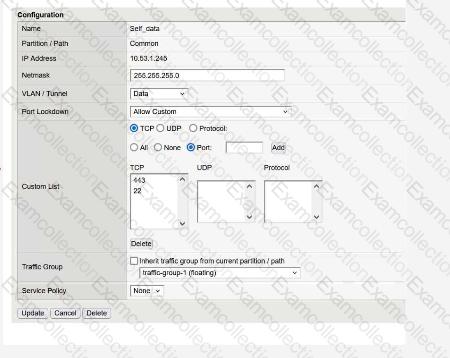
What traffic will be permitted to reach the BIG-IP?
The BIG-IP Administrator uses Secure Copy Protocol (SCP) to upload a TMOS image to the /shared/images/ directory in preparation for a TMOS upgrade.
After the upload is completed, what will the system do before the image is shown in the GUI under:
System » Software Management » Image List ?
