

Summer Sale Special Limited Time 70% Discount Offer - Ends in 0d 00h 00m 00s - Coupon code: xmas50

Fortinet NSE7_SOC_AR-7.6 - Fortinet NSE 7 - Security Operations 7.6 Architect

Page: 2 / 3
Total 91 questions

Refer to the exhibit.

A list of FortiSIEM connector actions is shown. You want to create a playbook on FortiSOAR that allows you to accomplish the following:

Manually input a range of IP addresses.

Use the connector action in the exhibit to retrieve a list of devices from the FortiSIEM configuration management database (CMDB) within that IP address range.

For each returned result, create an asset record based on the IP address of the device.

Which combination and order of step operations fulfills the requirements with the fewest required playbook steps?

A.

1) Connector action, 2) Create record, 3) Update record

B.

1) On create trigger, 2) Connector action, 3) Code snippet, 4) Create record

C.

1) Manual trigger, 2) Connector action, 3) Create record

D.

1) Manual trigger, 2) Set variable, 3) Connector action, 4) Create record, 5) Update record

Which two statements accurately describe the Custom API Endpoint playbook trigger? Choose two answers.

A.

It supports token-based, basic, and no authentication.

B.

One custom API endpoint can trigger multiple playbooks at the same time.

C.

It supports HTTP POST, GET, and PUT methods.

D.

An external system can initiate a playbook using an arbitrary endpoint on FortiSOAR.

What are three capabilities of the built-in FortiSOAR Jinja editor? (Choose three answers)

A.

It renders output by combining Jinja expressions and JSON input.

B.

It checks the validity of a Jinja expression.

C.

It creates new records in bulk.

D.

It loads the environment JSON of a recently executed playbook.

E.

It defines conditions to trigger a playbook step.

Refer to the exhibit. What is the correct Jinja expression to filter the results to show only the MD5 hash values?

{{ [slot 1] | [slot 2] [slot 3].[slot 4] }}

Select the Jinja expression in the left column, hold and drag it to a blank position on the right. Place the four correct steps in order, placing the first step in the first slot.

A large enterprise FortiSIEM deployment is experiencing delays in log correlation and analytics. Which architectural adjustment is most appropriate? Choose one answer.

A.

Limit the number of rules using streaming mode.

B.

Add more workers.

C.

Add more collectors.

D.

Increase supervisor CPU and memory.

You want to use the queue and shift management feature to automatically assign newly created low-priority tasks to members of the L1 queue. However, you are unable to add the Tasks module to the Module Types list. What is the problem? Choose one answer.

A.

The Queueable option is disabled for the Tasks module.

B.

There is a higher priority queue for the Tasks module.

C.

The Tasks module is not supported by queue and shift management.

D.

Shift-based assignment is disabled.

A very long FortiSOAR playbook failed at step 30 because of an intermittent networking issue, which has now been resolved. You want to finish executing the playbook without repeating earlier steps or losing prior context. Which action should you take? Choose one answer.

A.

Use mock input for step 30 and re-run the playbook.

B.

Use the Load ENV JSON option in the Jinja Editor and then render the output.

C.

Use the Rerun From Last Failed Step option from the executed playbook logs.

D.

Add a connector from the trigger to step 30 directly and re-run the playbook.

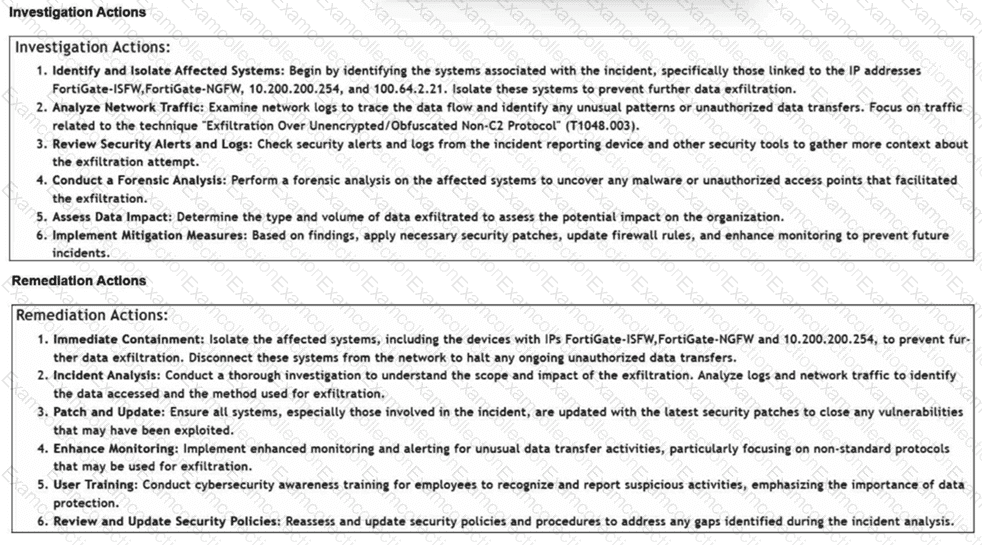
Review the incident report:

Packet captures show a host maintaining periodic TLS sessions that imitate normal HTTPS traffic but run on TCP 8443 to a single external host. An analyst flags the traffic as potential command-and-control. During the same period, the host issues frequent DNS queries with oversized TXT payloads to an attacker-controlled domain, transferring staged files.

Which two MITRE ATT & CK techniques best describe this activity? (Choose two answers)

A.

Non-Standard Port

B.

Exploitation of Remote Services

C.

Exfiltration Over Alternative Protocol

D.

Hide Artifacts

Match the FortiSIEM device type to its description. Select each FortiSIEM device type in the left column, hold and drag it to the blank space next to its corresponding description in the column on the right.

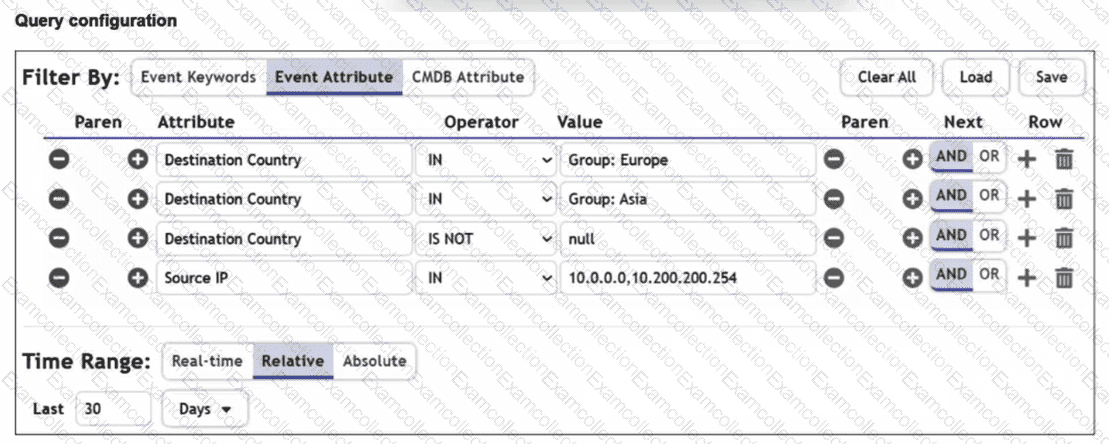
Refer to the exhibit.

You are reviewing the Triggering Events page for a FortiSIEM incident. You want to remove the Reporting IP column because you have only one firewall in the topology. How do you accomplish this? (Choose one answer)

A.

Clear the Reporting IP field from the Triggered Attributes section when you configure the Incident Action.

B.

Disable correlation for the Reporting IP field in the rule subpattern.

C.

Remove the Reporting IP attribute from the raw logs using parsing rules.

D.

Customize the display columns for this incident.